New User Interface to Edit Parameter Default
SMARTElectrode provides a new auxiliary user interface to edit rules for parameters.
Usage
In the current electrode assembly, click to open Parameter Configuration dialog box. Double-click a parameter to open the Edit Parameter Default dialog box.
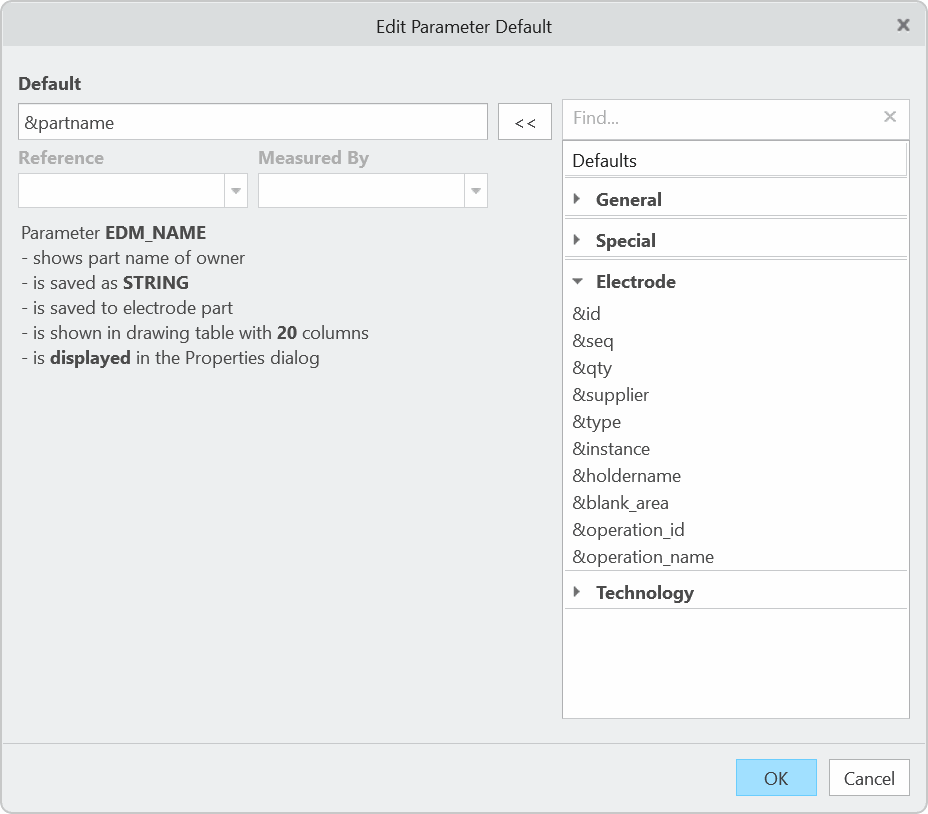
Parameter rules can be selected from the list of available defaults on the right side of the user interface. Parameters evaluating
position or angle information need additional information.
What is the benefit of this enhancement?
- Shows a complete list of all defaults.
- Displays only applicable defaults.
- Provides a detailed description of the parameter.
- No need to edit parameter.cfg interactively anymore.
Additional Information
|
Tips:
|
None.
|
|
Limitations:
|
No known limitations.
|
|
Does this replace existing functionality?
|
No |
|
Configuration options associated with this functionality:
|
None.
|